
Workplace safety depends on having the right information available when hazardous chemicals are present. That's where safety data sheets (SDS) come in. An SDS gives facility managers, safety officers, and employees the information they need to store, use, and respond to products correctly.
A safety data sheet is a standardized document that manufacturers are required to provide for any hazardous chemical product they sell. It details:
In the United States, SDS requirements fall under OSHA's Hazard Communication Standard (1910.1200), which aligns with the Globally Harmonized System of Classification and Labeling of Chemicals (GHS), an international framework that standardizes how chemical hazards are classified and communicated. This alignment means an SDS follows the same 16-section format regardless of which country or manufacturer produced it.
Manufacturers and importers are responsible for creating and providing an SDS for each hazardous product they distribute. Employers, in turn, are responsible for maintaining accessible copies of those SDS documents on-site and ensuring employees know how to locate and interpret them.
SDS documents are typically available in the following ways:
Simple Green maintains a complete, searchable library of current SDS documents for every product. To find one:
Because SDS documents are updated periodically, it's worth checking the Data Sheets page periodically rather than relying on a saved copy indefinitely.
Safety data sheets follow a standardized structure consisting of 16 sections, designed to give chemical handlers and emergency responders quick access to the information they need most. Here's an overview:
Sections 1–8 cover the information most likely to be needed urgently: identification, hazards, composition, first-aid measures, firefighting measures, accidental release (spill) measures, and safe handling and storage.
Sections 9–11 contain technical and scientific data about the substance or mixture, including physical and chemical properties, stability and reactivity, and toxicological information.
Sections 12–15 aren't mandated by OSHA but are included to achieve full GHS compliance. They typically cover ecological impact, disposal considerations, transport information, and other regulatory information.
Section 16 closes out the document with details about the SDS itself, including its revision date and a summary of changes since the previous version.
For the full regulatory breakdown, OSHA's Hazard Communication Standard for Safety Data Sheets outlines each section in detail.
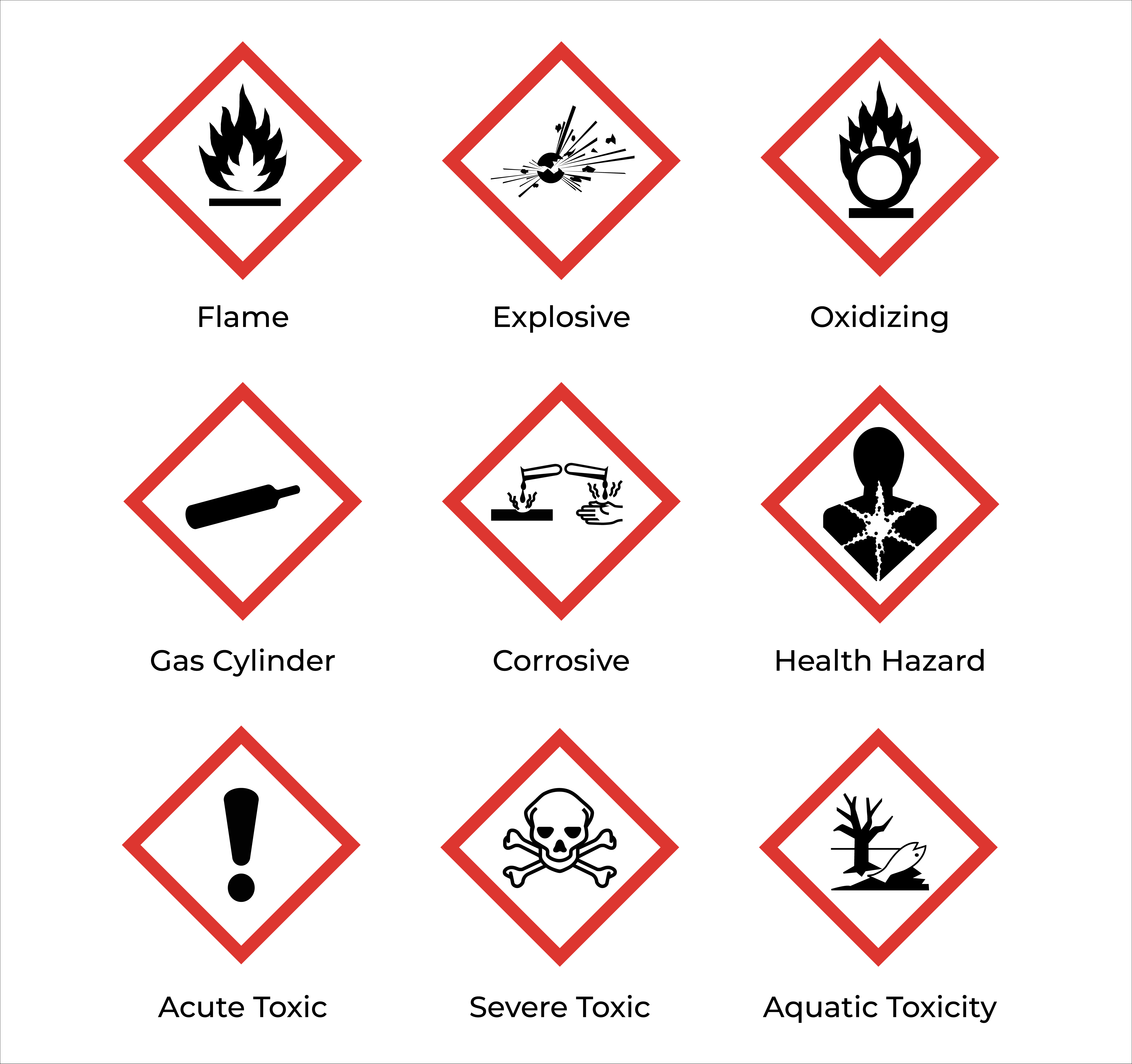
GHS pictograms are the diamond-shaped, red-bordered icons found on product labels and in Section 2 of an SDS. Each communicates a specific hazard class at a glance:
Recognizing these symbols quickly is often the first step in understanding how a product needs to be stored, handled, and labeled on-site.
When evaluating two products for the same job, especially when a facility is considering switching cleaning products, the SDS is one of the most useful tools for an apples-to-apples comparison. A few things worth checking side by side:
| Example: Comparing Two Degreasers Side by Side | ||
|---|---|---|
| Corrosive Degreaser | Crystal Simple Green | |
| Signal Word | Danger | None |
| Hazard Classification | Flammable liquid, Category 2 | Not flammable |
| Required PPE | Chemical-resistant gloves, face shield, respiratory protection | Gloves, safety glasses |
| Storage Requirements | Flammables cabinet, away from ignition sources | Standard chemical storage |
Comparing SDS documents side by side gives facilities a data-driven way to evaluate alternatives, rather than relying on marketing claims alone. The classifications, signal words, and handling requirements in Sections 2 through 8 tell the more complete story of how a product will fit into daily operations.
Knowing how to read and compare SDS sheets helps facilities make informed, compliant purchasing and safety decisions, from choosing the right product for a job to training employees on proper handling procedures.
Ready to compare? Browse Simple Green SDS Documents
